

Setup DB2
for logging PBX events
In this chapter you can learn how to log PBX events of Ozeki Phone System XE using a DB2 database server. In this guide you can see the installation steps, the database connection string, the database connection type and the recommended database table layout for DB2 database.
If you would like to save the PBX events with DB2 database server, follow this detailed guide.
During the configuration you should choose the following database connection type:
You should use the following database connection strings:
If you use a TCP/IP connection:
Initial Catalog=MyCatalog;Package Collection=MyPackageCollection;Default Schema=MySchema;
User ID=MyUsername;Password=MyPassword;
If you use APPC connection:
Initial Catalog=MyCatalog;Package Collection=MyPackageCollection;Default Schema=MySchema;
User ID=MyUsername;Password=MyPassword;
The previous database connection string has to be modified to match your database.
The connection string and the connection type should be entered on the Database Logging SQL API configuration form.
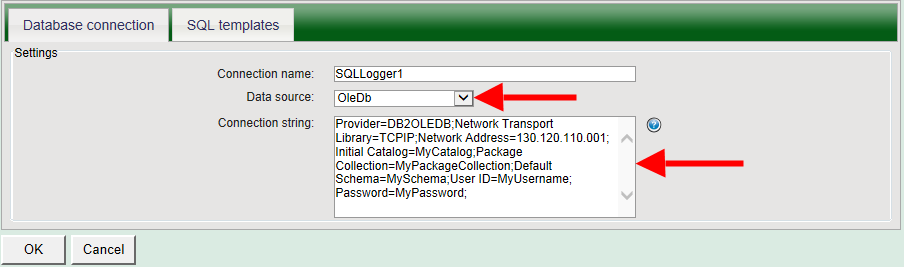
Figure 5 - Specifying the connection string for the DB2 database
In the following figure you can see the SQL templates tab of the Database logging API. Here, you need to provide the SQL queries that will store PBX events.
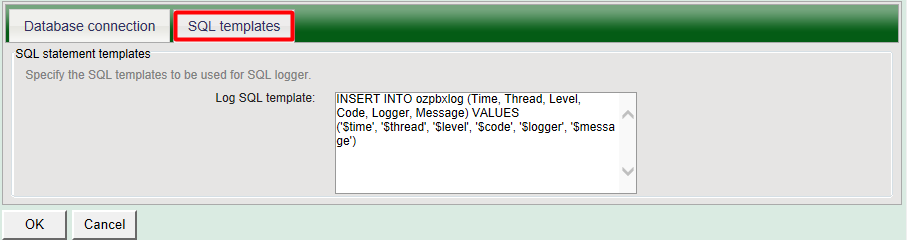
Figure 6 - Specifying the SQL queries for storing PBX events
After the Database Logging SQL API has been configured in the Ozeki Phone System XE, you need to create the database tables for Database Logging SQL API. Use the following table layout:
-- -----------------------------------------------------
-- Table `OzekiPBX`.`ozpbxlog`
-- -----------------------------------------------------
CREATE TABLE ozpbxlog (
   (id integer NOT NULL GENERATED ALWAYS AS
       IDENTITY (START WITH 1 INCREMENT BY 1),
    Time          TIMESTAMP    NOT NULL,
    Thread        INTEGER      NOT NULL,
    LogLevel      VARCHAR(20)  NOT NULL,
    Logger        VARCHAR(255) NOT NULL,
    Message       CLOB         NOT NULL,
    PRIMARY KEY (id))
If you have any questions or need assistance, please contact us at info@ozekiphone.com.
Dig deeper!
People who read this also read...