

Setup FoxPro for
sending and receiving SMS
In this chapter you can learn about how to send and receive SMS messages using a FoxPro database server with your Ozeki Phone System XE. In this guide you can get information about the installation steps, the database connection string, the database connection type and the database table layout for FoxPro database server.
In order to send or receive SMS messages using a FoxPro database server, you need to following the instructions.
During the configuration you have the chances to use OleDb or Odbc connection types.
In case of the OleDb connection you need to choose OleDb type:
Connection string for OleDb connection:
If you use Odbc connection type, you need to select Odbc connection type:
Connection string for Odbc driver:
The database connection string has to be modified to match your database.
The connection string and the connection type should be entered on the SQL SMS API configuration form.

Figure 5 - Specifying the connection string for the FoxPro database
Figure 6 shows the SQL queries that will send the SMS messages from your database.

Figure 6 - SQL queries for receiving SMS messages
Under the SQL for receiving tab, you need to provide an SQL query that will store the incoming SMS messages. Figure 3 shows the SQL query that you need to use.
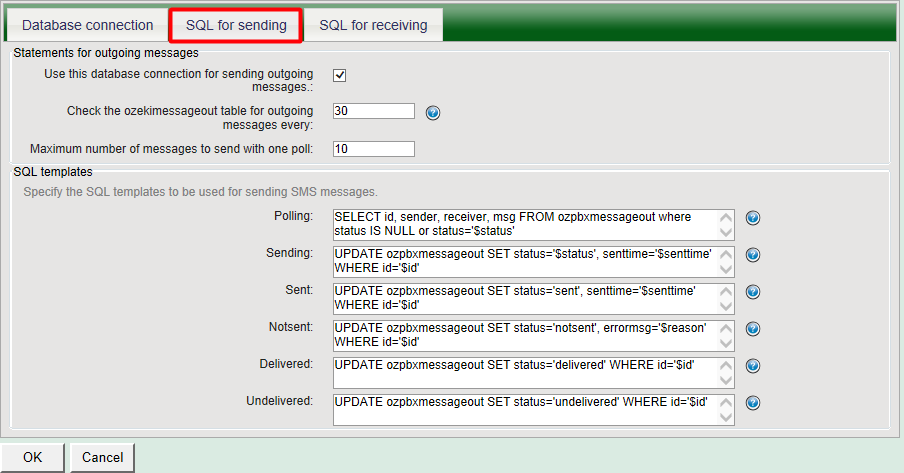
Figure 7 - SQL query for sending SMS messages
After the SQL SMS API has been configured in the Ozeki Phone System XE, you need to create the database tables for SQL SMS API. Use the following table layout:
-- -----------------------------------------------------
-- Table `OzekiPBX`.`ozpbxmessageout`
-- -----------------------------------------------------
CREATE TABLE ozpbxmessageout
   (id I AUTOINC NEXTVALUE 1 STEP 1 PRIMARY KEY,
	sender C(30) NULL,
	receiver C(30) NULL,
	msg N NULL,
	senttime C(100) NULL,
	receivedtime C(100) NULL,
	reference C(100) NULL,
	status C(20) NULL,
	msgtype C(160) NULL,
	operator C(100) NULL,
	errormsg C(250) NULL)


-- -----------------------------------------------------
-- Table `OzekiPBX`.`ozpbxmessagein`
-- -----------------------------------------------------
CREATE TABLE ozpbxmessagein
   (id I AUTOINC NEXTVALUE 1 STEP 1 PRIMARY KEY,
	sender C(30) NULL,
	receiver C(30) NULL,
	msg N NULL,
	senttime C(100) NULL,
	receivedtime C(100) NULL,
	extension C(100) NULL)
It is strongly recommended to maintain an index in the database for the 'id' field of the outgoing SMS table to support faster SQL updates.
If you have any questions or need assistance, please contact us at info@ozekiphone.com.
Dig deeper!
People who read this also read...