
How to setup Gtalk with Ozeki PBX
If you like Google communication applications so much that this is what you would like to use for VoIP calls, then this article might disappoint you, because it is not an easy thing to do. You will learn, though, how it is possible to set it up in the simplest possible way.
The root of the problem is that Google does not support SIP, which is a key part of the process. There is however a gateway, called SIP Gateway, which makes it possible for Google applications to initiate VoIP calls.
SIP stands for Session Initiation Protocol, which starts, ends and maintains connection during a multimedia session. VOIP is the acronym for Voice over Internet Protocol, that is the protocol that directs multimedia transmission via the Internet.
During a call, the data is transmitted to a PBX over the Internet, which is reached through a Wi-Fi router and the transmission regulated by a voip provider, and in the end, all the data arrives at the desired VoIP phone, which means that the call has been established, as demonstrated by Figure 1.
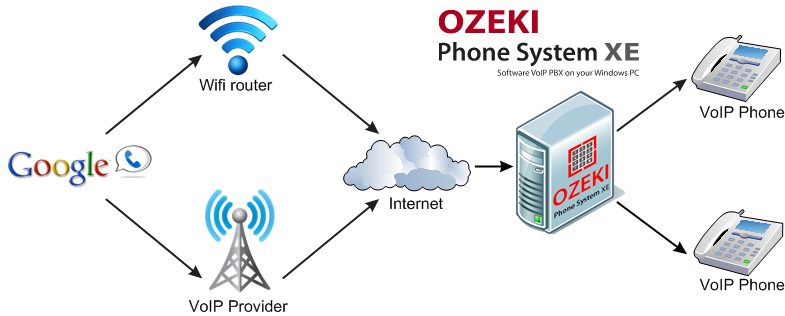
Figure 1 - How to Setup Google Talk Connect with Ozeki PBX
- Google Talk account
- xGVout (Google Voice Outgoing Proxy Dialler)
- Gizmo5 account
- Ozeki Phone System XE
- Log in to Gtalk.
- In the Phones menu of Settings, Add another phone.
- Give the Gizmo5 Sip number that you previously got.
- Verify the number in Gizmo5.
- Still in Gizmo5, enter your Google number in the field on top.
- Select ON, to enable Google.
- In xGVout, type proxy01.sipphone.com into SIP server field.
- Give your Gizmo number in Phone field.
- Enter your Google username and password where they are needed.
- In Ozeki Phone System XE, give your Gizmo5 number where User ID, Display Name and Register Name are asked.
- Enter your Gizmo5 password in Register Password field.
- Enter proxy01.sipphone.com into Domain Server field.
- Click on Register.
- You can make calls from Gizmo5.
- When you hear a busy tone, hang up, and Google will call you back, connected to the called number.
It may look complicated, but if you like Google applications so much, then this short procedure will be worth performing. As you can see Ozeki Phone System XE provides a solution to every problem to prove you its flexibility and reliability. So if you need the most recent developments in telephony, if you would like to use the technology of the future or if you need an easy, yet powerful system, then Ozeki Phone System XE is the best choice for you.
People who read this, also read the following: